Reply Mail Management allows you to establish rules for when unsubscribe or stop requests are honored and then remaining replies are forwarded to another address. When you need to forward email replies to another address than what is configured within Reply Mail Management settings, you have a few different options.
Use Specified Information
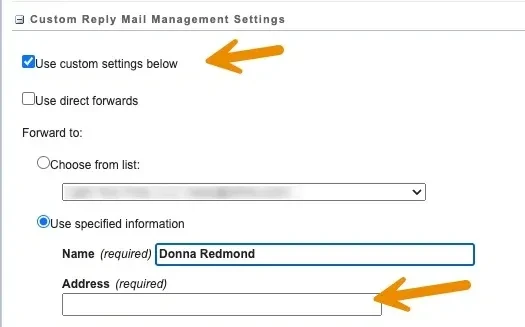
First, select the check box for using custom settings and then select the radio button for "use specified information." You can then enter the Name and Email address of your choice. Any requests to unsubscribe are honored before forwarding to the provided address and you do not need to pre-verify the address at this time and you may also optionally use a dynamically populated address. When forwarding replies with this option, you cannot readily access information that was forwarded.
Use Direct Forwards
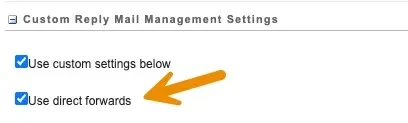
If you want to bypass Reply Mail Management completely to prevent unsubscribe and stop requests from being honored directly, this is also an option. First, select the check box for using custom settings and then select the checkbox for using direct forwards. When forwarding replies with this option, you cannot readily access information that was forwarded.
Forward Using a Triggered Send
Your final option is to forward replies using a triggered send. With this option... you can not only forward replies to the static or dynamic address specified, but you can also log evidence of the reply that was forwarded into a local Data Extension. To make this easier to implement, I've created a package using Package Manager.
The package installs a Data Extension named "RMM_Log" into your main Data Extensions folder. It will also create a baseline message for the triggered send which is used to manage the forward while still passing through the original message contents. You can use this message to complete other functions as well such as logging a Salesforce Case, populating other details into the data extension, etc.
This video describes how to install the package and create a simple triggered send as well as how to configure the Sender Profile.
This package was created based upon techniques provided in Eliot Harper's blog which you are encouraged to check out as you'll learn so much there. Eliot Harper's blog

Where this option is especially helpful is when you need to dynamically populate a From Name using AMPScript while using a From Email that leverages the SAP being used.
Need Help Configuring Reply Mail Management?
Light Your Fires can help you set up forwarding, logging, and triggered send workflows so no reply ever falls through the cracks.
Let's Talk